Plan and limits
Read the Sayvara Plan and limits page - your edition, status, limits, use, included features, the trial and the sandbox.
The Plan and limits page shows what your plan includes and how much of it you have used. Go to Settings > Plan. Only owners and admins see it.
There are no prices on this page. To change your plan or a limit, contact your Sayvara account manager.
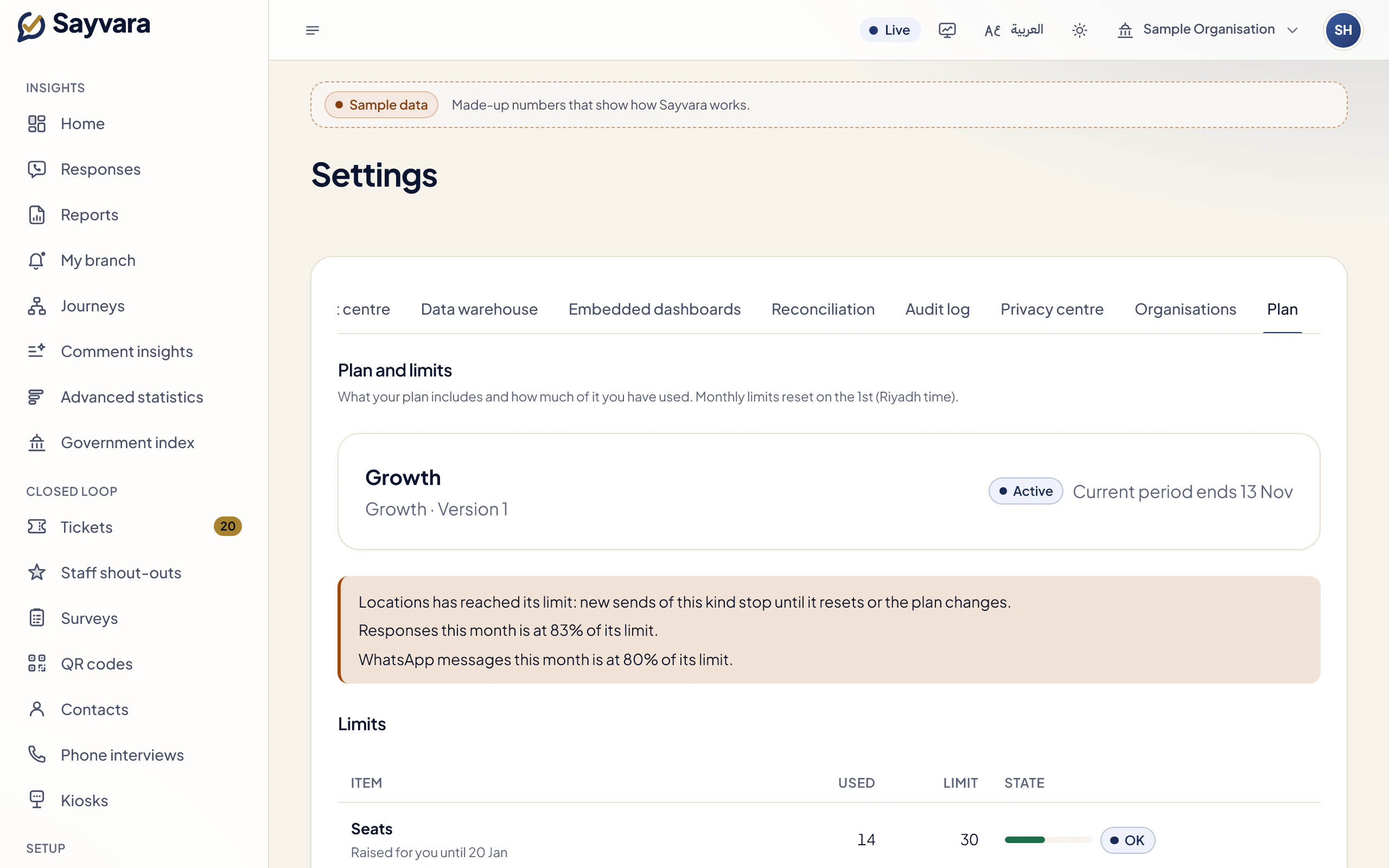
The top of the page
- The edition: Trial, Starter, Growth or Enterprise, and its version.
- The status: Trial, Active, Payment due, Paused, Canceled or No plan.
- Trial ends with a date, during a trial.
- Current period ends with a date.
When your organisation has no plan, the page shows that no plan is assigned and no plan limit applies to your organisation. Your Sayvara contact sets the plan with you, or the owner chooses one under Settings > Plan > Billing and payments > Change plan.
Limits
The Limits table shows each limit with Item, Used, Limit and State.
Items you may see:
- Seats, Caller seats, Supervisor seats
- Locations
- Live surveys
- Responses this month
- WhatsApp messages this month, SMS this month, Emails this month, Messages today
- AI analyses this month, AI copilot questions this month
- Voice minutes this month
A limit can show Unlimited, Not counted yet, Resets with a date, or Raised for you until a date when your account manager raised it for a while.
Monthly limits reset on the 1st, Riyadh time. During a trial, limits count once for the whole trial and do not reset each month.
Limit states
| State | Meaning |
|---|---|
| OK | Plenty left |
| Near the limit | Most of it is used |
| Limit reached | New sends of this kind stop until it resets or the plan changes |
| Over the limit | Use above the plan is billed at the end of the period, or reviewed with you at renewal |
| Not in your plan | The feature is not included |
| Suspended / Read-only | The organisation is suspended or read-only |
Banners at the top tell you when something is near or at its limit, for example "WhatsApp messages this month is at 85% of its limit."
Included features
The Included features list shows each feature as Included or Not in your plan. Examples:
- API access, Integrations, Data export
- Phone interviews, Calls from the browser
- Agent and team performance report
- Ticket parts for other teams
- Working-hours calendars and escalations
- Shareable dashboard links
- Advanced statistics and forecasts
When a page in Sayvara says a feature is not in your plan, this list confirms it.
Trial
During a trial the page says Trial ends and the date.
When the trial ends, your organisation is read-only. You can still read, export your data and choose a plan, but nothing new is sent, published or created. Without a plan it is suspended after a few days. Nothing is deleted.
Suspended or canceled
- Suspended: sending and AI are stopped. Your data and incoming responses are kept. Contact Sayvara support.
- Canceled: plan features are off. Incoming responses are still kept.
Sandbox
A sandbox is a separate test copy of your organisation with sample data. It shows a Sandbox badge. Nothing is ever sent to customers from it, and it never holds your real data. Use it to try surveys and rules safely.
Related pages
Was this page helpful?
Thanks. Need more help? Email support@sayvara.com