Inbox
One list in Sayvara for tickets, survey comments, reviews, and Instagram and Messenger direct messages.
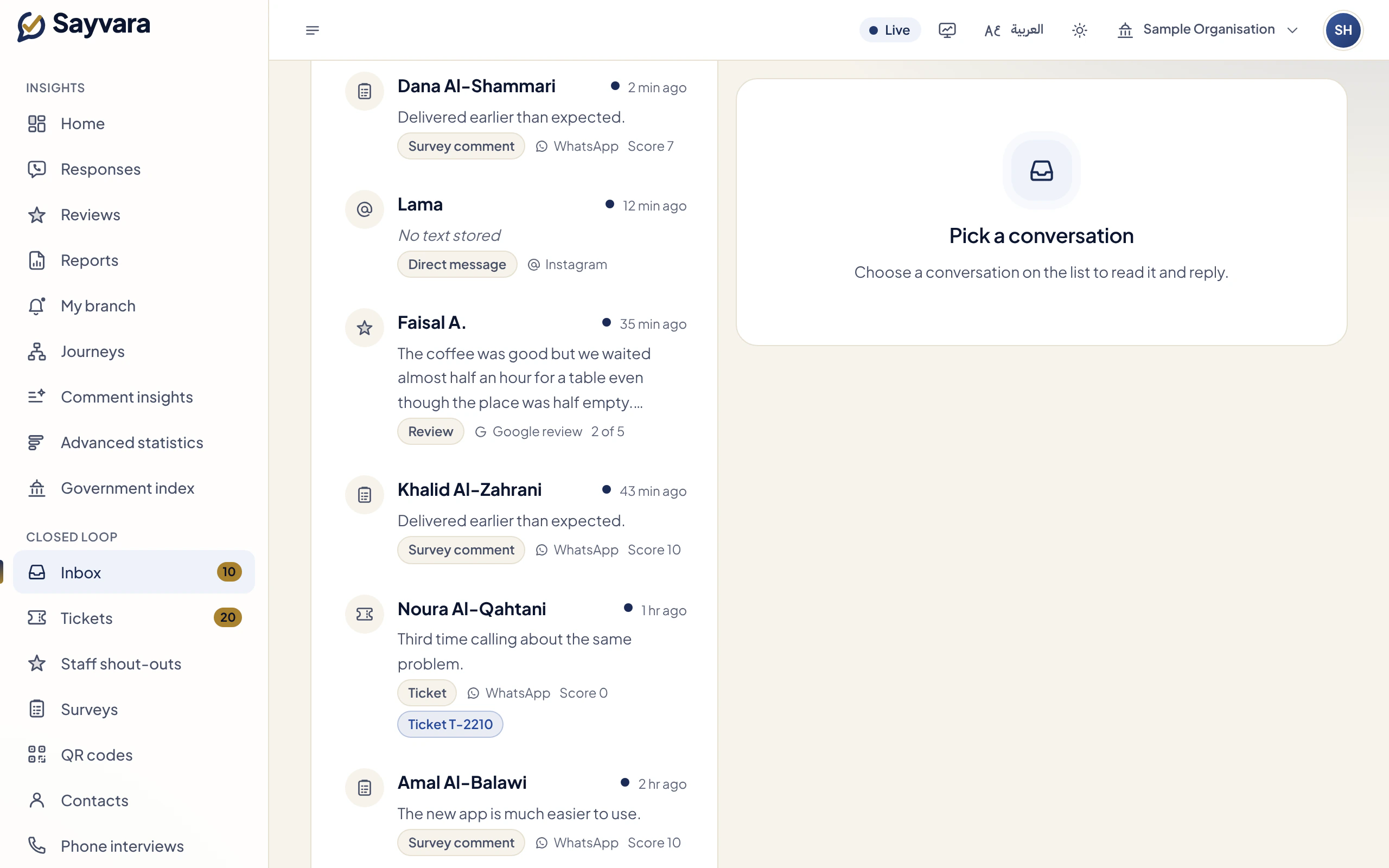
The Inbox puts four kinds of conversation in one list, newest first: tickets, survey comments, reviews, and Instagram and Messenger direct messages. You read each one, give it to a person, link it to the customer's ticket and mark it done when it is handled. You no longer need to check Tickets, Responses and Reviews one by one.
Open it from the side menu: Inbox, in the closed-loop group just above Tickets. The number next to it is how many open conversations with activity in the last 90 days you have not read.
What you find in the inbox
| Type | What it is | What you can do |
|---|---|---|
| Ticket | A follow-up ticket and its WhatsApp or SMS conversation with the customer | Read, add internal notes, reply, mark done, snooze |
| Survey comment | A survey answer with a written comment that has no ticket of its own | Read, assign, link to the customer's ticket and reply through it, mark done, snooze |
| Review | A public review from Google, the App Store or Google Play | Read, assign, mark done, snooze. You answer it in Reviews |
| Direct message | An Instagram or Messenger conversation. Sayvara keeps who wrote and when, never the words | See who wrote, assign, link to the customer's ticket and reply through it, mark done, snooze |
Reviews and direct messages are shown only to people who work across the whole organisation. A direct message row shows No text stored in place of the first words.
Replying to customers works only when Sayvara has switched replies on for your organisation. Notes, linking and the rest of the inbox work either way. See Reply and link a ticket.
Each row shows the customer's name, when the conversation last moved, the first words, the type and the channel. Some rows also show a score (for example Score 7), a star rating (for example 2 of 5), a linked ticket (Ticket and its number) or Snoozed until a time. A dot marks a conversation you have not read.
A complaint email that your organisation forwards to Sayvara appears in the inbox on the Email channel, and as a ticket once Sayvara opens one for it. Replies go through that ticket, by WhatsApp or SMS.
Pages in this topic
| Page | What you learn |
|---|---|
| Work the inbox | Filter the list, keep saved views, tag conversations, open a conversation, mark it done, snooze it, mark it read or unread, and assign it |
| Reply and link a ticket | Link a survey comment or direct message to the customer's ticket, and reply to a customer through a ticket |
| Assignment rules | Give each new survey comment, review, direct message or unmatched message to a person automatically, to one person or in turns |
| Who sees what | Which roles see the inbox, what a branch sees, what read-only roles can do, and who manages tags and assignment rules |
Live updates
You do not need to reload the page. New survey answers, ticket changes, and new reviews and direct messages appear in the list by themselves within a few seconds. While the page is on screen, it also checks again every few minutes, so no update is missed. The number on the Inbox menu item follows the same updates.
A good habit
Start each shift with the Unread button at the top of the list, then Mine. Mark each conversation done when it is handled, so the list shows only what still needs you.
Related pages
Was this page helpful?
Thanks. Need more help? Email support@sayvara.com