Ticket assignment
Share new Sayvara tickets across your team by round robin or load balancing, cap open tickets per person and set yourself away.
Without a rule, a new ticket goes to the branch manager. Assignment rules share tickets across your team instead: by turn, or to whoever has the fewest open tickets. People who are away or full are skipped.
Only owners and admins can change the rules. Everyone who works tickets can set their own away status.
Open the page
- Go to Tickets.
- Select Assignment rules at the top of the page.
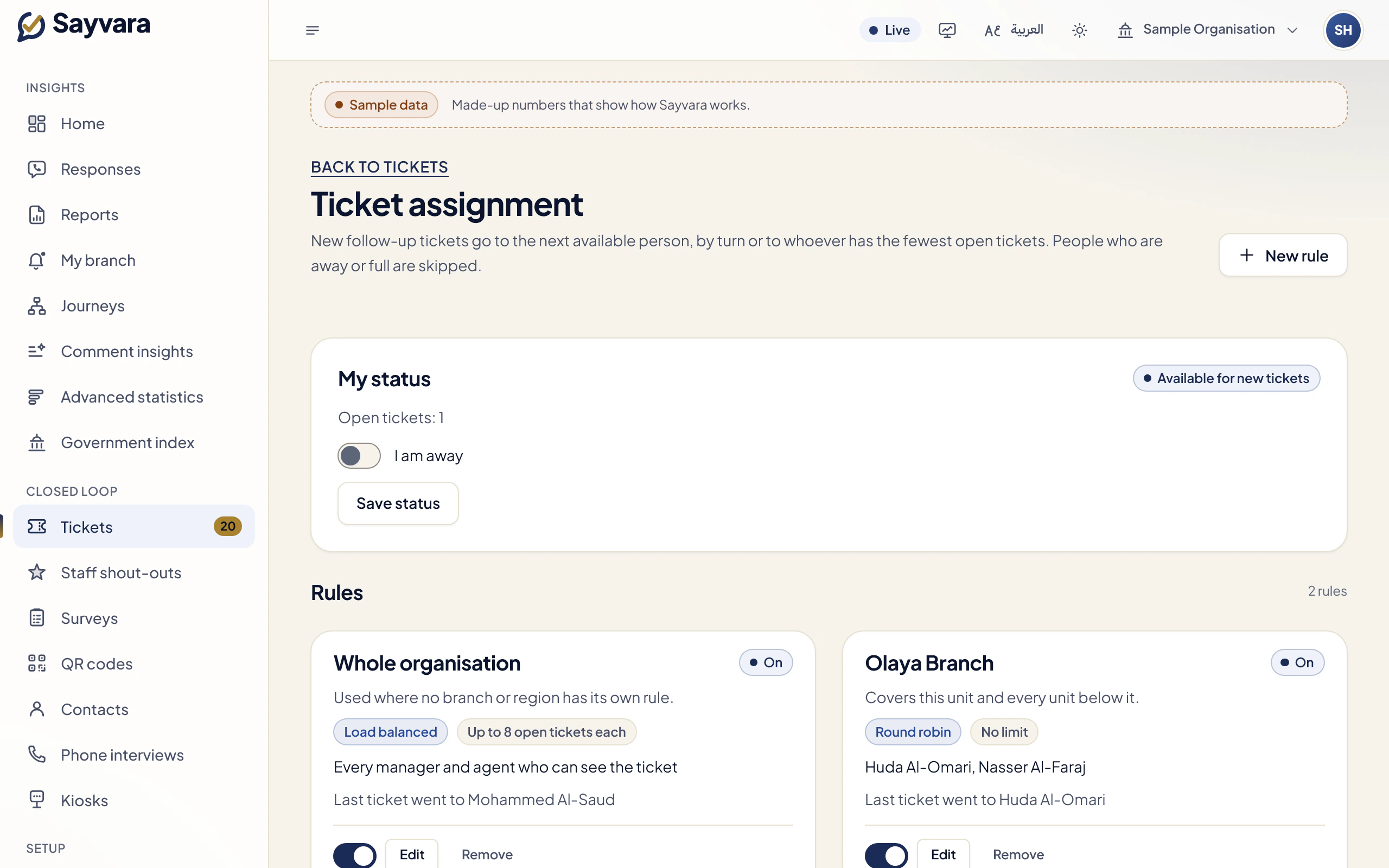
The page Ticket assignment has three parts: My status, Rules and Team status.
Create a rule
- Under Rules, select New rule.
- Choose the Queue: a region, branch or team. The rule covers this unit and every unit below it. Choose Whole organisation for a rule used where no branch or region has its own.
- Choose How to share:
- Round robin: everyone gets a ticket in turn.
- Load balanced: the person with the fewest open tickets gets the next one.
- In Most open tickets per person, type a number, or leave it empty for no limit. A full person is skipped until one of their tickets is resolved.
- Under People, choose who takes tickets. Choose nobody to include every manager and agent who can see the ticket.
- Leave Rule is on ticked.
- Select Create rule.
A person only gets a ticket when they can see its branch.
Which rule wins
The most specific rule wins. A ticket from a branch with its own rule uses that rule. Otherwise the rule of its region is used, and then the Whole organisation rule. Each queue can have one rule.
Edit, turn off or remove a rule
On a rule, select Edit to change it, or switch it Off. Select Remove to delete it: new tickets of that queue then go to the next rule up. Each rule shows Last ticket went to a name, so you can see it working.
Set yourself away
When you are on leave or busy, stop new tickets coming to you:
- Under My status, switch on I am away.
- Optionally set Back on (optional). Leave it empty to stay away until you switch it off.
- Select Save status.
Your status shows Away: no new tickets. Tickets you already have stay with you. Open tickets shows how many.
Team status
Team status lists each person with their Role, Open tickets and Status: Available, Away or Away until a date. Owners and admins can set someone away from here.
Messages you may see
| Message | What it means |
|---|---|
| This queue already has a rule. Change that one instead. | Edit the existing rule. |
| One of the people cannot see any branch of this queue. | Choose people whose scope includes the queue. |
| The return time must be in the future. | Pick a future date. |
Related pages
Was this page helpful?
Thanks. Need more help? Email support@sayvara.com