Derived variables
Make your own groupings, 0-100 indexes and bands from every answer, then use them in breakdowns, cross-tabs and CSV exports.
A derived variable is a new value that Sayvara works out from each response, using rules you set. Once saved, it appears in breakdowns, cross-tabs and exports like any built-in grouping. There are three types:
| Type | What it does | Example |
|---|---|---|
| Recode | Groups the values of a question or grouping into your own categories. | Put WhatsApp and SMS in "Messaging", web link and email in "Online". |
| Index | Combines up to 10 scores into one number from 0 to 100. | One "Service index" from NPS, satisfaction and effort. |
| Bands | Cuts a score or an index into ordered categories. | "Low", "Middle" and "High" from your service index. |
Variables belong to the whole organisation, and each has a name in English and in Arabic.
Open Derived variables
Derived variables are switched on per organisation. To have them switched on for yours, contact Sayvara support. See Getting help.
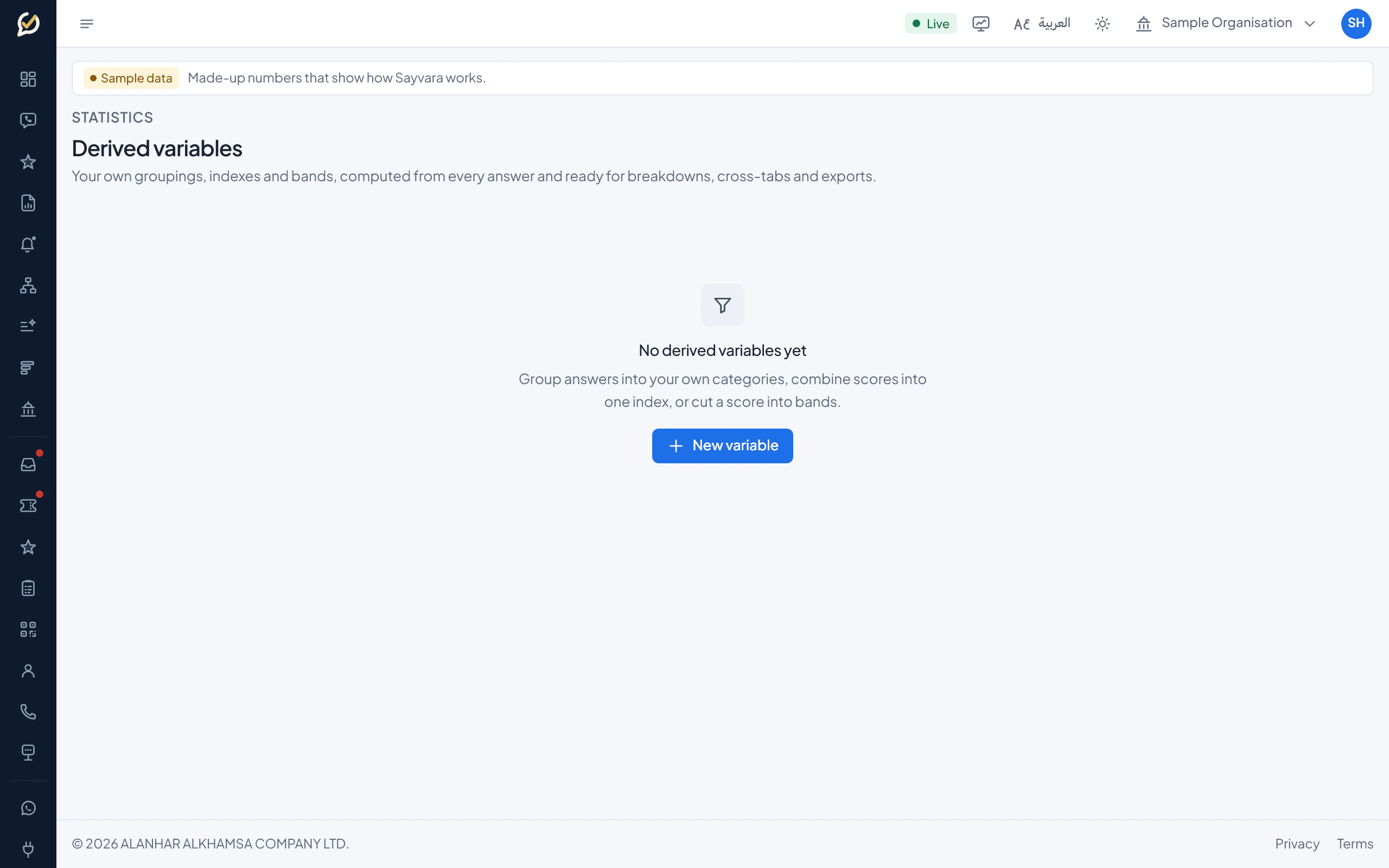
The screen has no side-menu entry. To open it:
- Go to app.sayvara.ai/derived-variables in your browser. Bookmark the page so you can come back to it.
- If Advanced statistics opens instead, Derived variables are not switched on for your organisation. Contact Sayvara support.
The Statistics link above the page title takes you back to Advanced statistics.
Who can do what
| Task | Who |
|---|---|
| See variables, breakdowns and cross-tabs | Owners, admins, managers, analysts, agents and viewers |
| Add, change or remove variables | Owners, admins and managers |
| Download the CSV export | People with the feedback export permission: owners, admins, managers and analysts |
Every figure is worked out only from the responses in the branches and units you can see. Other people see the same variables, computed for their own scope.
If you cannot add variables and none are saved, the page says Only owners, admins and managers can add or change derived variables.
Create a variable
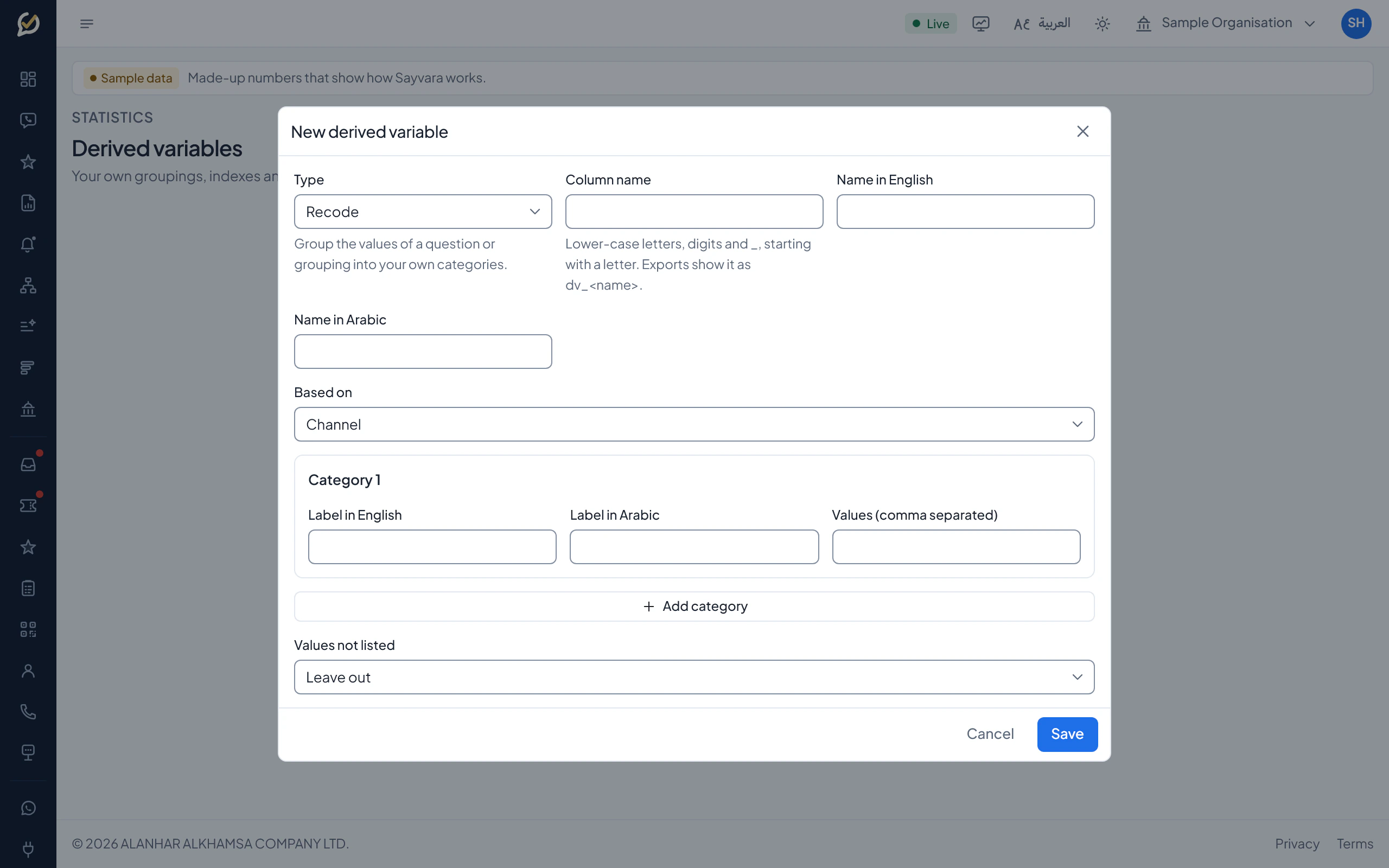
- Select New variable. The New derived variable window opens.
- Choose a Type: Recode, Index or Bands.
- Enter a Column name: lower-case letters, digits and _, starting with a letter, up to 40 characters. Exports
show it as
dv_<name>, for exampledv_service_index. - Enter the Name in English and the Name in Arabic (up to 120 characters each).
- Fill in the fields for the type you chose, as described below.
- Select Save. Pressing Enter in a field also saves.
If something needs fixing, the window shows Check the highlighted fields. and a short note under each field.
Recode
- In Based on, pick what to group: Channel, Language, Sentiment, NPS group, CSAT group, CES group, Theme, Branch or unit or A question. For A question, enter the Question id of a choice, rating or number question in your survey.
- For each category, enter a Label in English, a Label in Arabic and the Values (comma separated) that belong to it. A value can sit in one category only. Select Add category for the next one.
- In Values not listed, choose what happens to answers that match no category:
- Leave out (the default): they get no value.
- Keep as they are: they keep their own value.
- Put in an "Other" category: they go into one extra category. Its Label in English and Label in Arabic start as "Other" and "أخرى", and you can change them.
A recode holds 1 to 50 categories, each with 1 to 200 values.
Index
- For each score, pick a Score: NPS (0-10), Satisfaction (1-5), Effort (1-7) or A question. Picking NPS, satisfaction or effort fills in the Lowest value and Highest value for you.
- Set a Weight above 0 (up to 100). A score with weight 2 counts twice as much as one with weight 1.
- Tick Higher is worse for scores where a high number is bad, such as effort.
- Select Add score for the next one (up to 10 scores). Each score can be used once in an index.
- In Scores needed for a value, set how many of the scores a response must have before it gets an index value.
The result is a number from 0 to 100. An index reads only number and rating answers, never text.
Bands
- In Based on, pick a score (NPS, satisfaction or effort), A question for a number question, or an index you have saved.
- For each band, enter a Label in English, a Label in Arabic and its upper limit in Up to. Each limit must be above the one before. The last band has no limit: it shows Everything above.
- Select Add band for more. A bands variable holds 2 to 20 bands.
The form starts with two bands, the first up to 6.
Read a breakdown
Each saved variable is a card with its name, its column (dv_<name>), its type and how many categories or scores it
has. Select Breakdown on a card to see Breakdown of that variable. Under the title, you see how many responses
were read and how many are without a value.
- Recode or bands: a bar for each category, and NPS by category.
- Index: the Average, the lowest and highest value, and ten bars of 10 points each.
When fewer than 30 answers back a figure, you see Fewer than 30 answers: read with care.
Choose the range and filter responses
Above the cards:
- Range: Last 30 days, Last 90 days (the default) or Last 12 months.
- Responses: All responses, or only the responses in one category of a recode or bands variable, shown as the variable name and the category, for example "Service band: High".
The filter applies to the breakdown, the cross-tab and the export.
Make a cross-tab
- In the Cross-tab card, pick Rows and Columns. You can choose your saved recode and bands variables, and Channel, Language, Sentiment, NPS group and Branch or unit.
- Select Show table. The table has a Total for each row.
Under the table, Sayvara tells you whether The difference between columns is statistically significant., or Tested: no significant difference between the columns. When no test could run, Sayvara says so instead, and gives the reason when it knows it, such as a column with too few answers.
An index cannot be a row or a column, because it is a number. Cut it into bands first. If you have no recode or bands variable, the card says Save a recode or bands variable to use it here. For the built-in cross-tab with significance letters, see Cross-tabs and comparisons.
Export a CSV
- In the Export card, under Variables to include, tick the variables you want (1 to 20).
- Select Download CSV. The file is
sayvara-derived-variables.csv.
For each response, the file has its date, branch or unit, survey, channel, language and scores, and one dv_ column
per chosen variable: the category label for a recode or bands variable, the number for an index. When a recode of
A question keeps unlisted answers as they are, those answers show as "Other answer", so customers' own words are
never in this file. Every export is recorded in the audit log, without any of the file's rows.
Without the export permission, the card says Exporting needs the feedback export permission.
Change or remove a variable
- Select Edit on a card to change its names or its rules. The Type and Column name stay as saved.
- Select Remove, then confirm Remove in the window. Breakdowns, cross-tabs and exports that used it no longer show it.
An index that a bands variable is based on cannot be removed. Remove or change the bands variable first.
Saving, changing and removing a variable are recorded in the audit log.
Messages you may see
| Message | What to do |
|---|---|
| That column name is already used. | Choose another column name. |
| You have reached 200 derived variables. | Remove a variable you no longer need. |
| Bands use this index. Remove or change them first. | Remove or change the bands variable based on it. |
| An index is a number. Cut it into bands to group by it. | Make a bands variable from the index and use that. |
| Bands can only cut a score, a number answer or an index. | Pick a score, a number question or an index in Based on. |
| That question has too many different answers to group by. | Put more answers into categories, set Values not listed to Leave out or Put in an "Other" category, or recode a choice or rating question. |
| Too many combinations. Narrow the range or pick other groupings. | Choose a shorter range or groupings with fewer categories. |
| More responses matched than can be read at once, so the oldest 20,000 were used. Narrow the range to see all. | Choose a shorter range. |
| Too many requests. Wait a minute and try again. | Wait a minute, then try again. |
Limits
| Item | Limit |
|---|---|
| Derived variables per organisation | 200 |
| Categories in a recode | 1 to 50, each with 1 to 200 values |
| Scores in an index | 1 to 10 |
| Bands | 2 to 20 |
| Variables in one export | 1 to 20 |
| Responses read at once | 20,000 |
Related pages
Was this page helpful?
Thanks. Need more help? Email support@sayvara.com